Tuesday, December 22, 2009

Nexus One Unboxing

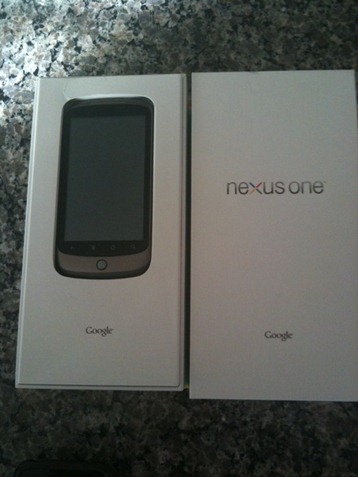
The first unboxing pictures of the upcoming Google Nexus One phone has been leaked viadjrobrob on twitter. The design of the box is very Google-like with white background color, and “Nexus One” and “Google” branding in black to go on top of it. Though the design of the box may not be the final thing, it leaves little to no doubt that this phone is indeed going to be a Google branded phone.
Google Nexus One Unboxing
For those of you who missed out on our earlier coverage, Nexus One is the name of the Google phone which has been designed by the folks at Google, and the hardware is manufactured in partnership with HTC. It looks a hell alot like HTC Passion/Dream which is also slated or 2010 launch. Nexus One, like Xperia X10 and HTC HD2, will be powered by the Snapdragon 1Ghz processor and it will ship with the latest Android 2.1 OS as preinstalled. Google is expected to announce the availability of Nexus One phone soon, with the rumored launch data of January 5th and a price tag of US $199 for the subsidized version.

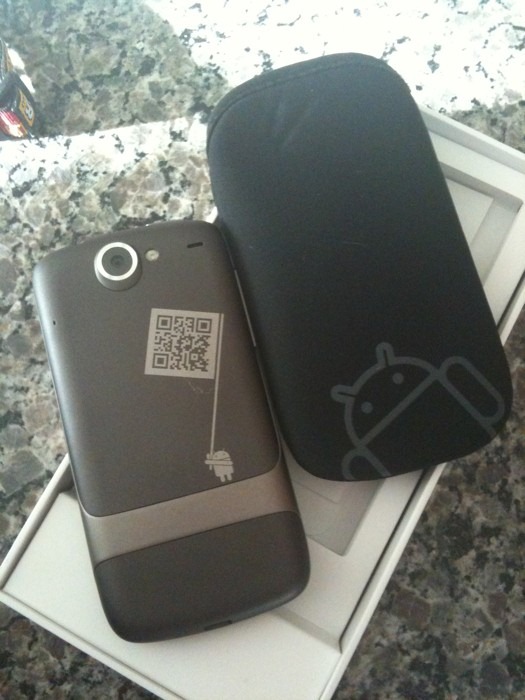
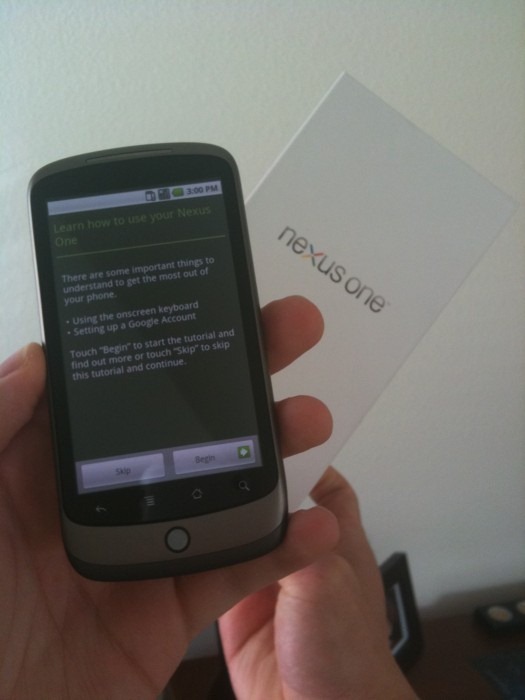
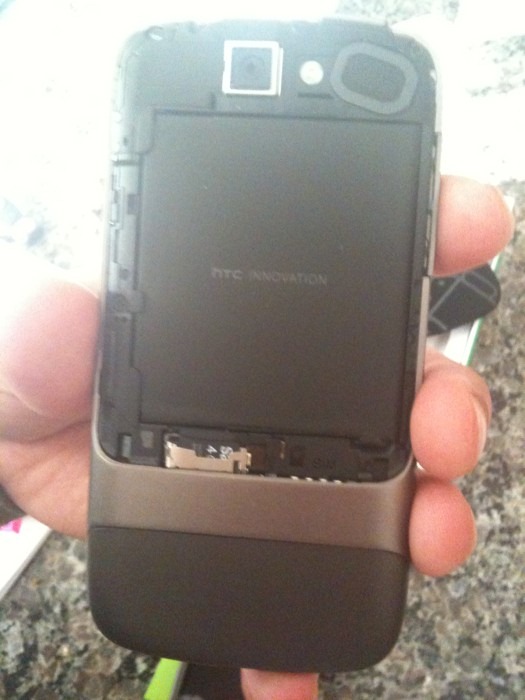
Nexus One Unboxing Nexus One Unboxing Nexus One Unboxing
Also leaked is a new video of the said device which shows off animated background wallpapers on Nexus One, running Android 2.1. Follow the steps posted here if you fancy getting these animated wallpapers on your Motorola Droid. [Thanks to niwasiuk for the tip!]


Check out the twit vid:
http://www.twitvid.com/5315F


Sunday, December 20, 2009

HTC HD2 2.01 ROM for T-Mobile US Leaks in the Wild!

We informed you about the new and upcoming T-Mobile US ROM for HTC HD2, which hinted towards a possible US release of the said device. And now it seems like the ROM has been leaked, and is available for download. Beware though as this ROM is for T-Mobile US only and it may have issues working properly with carriers outside United States.
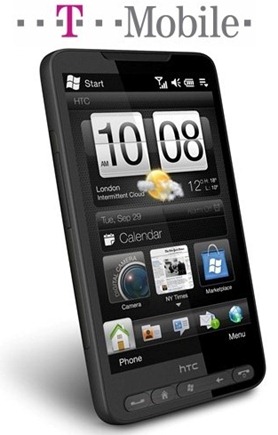
HTC HD2 on T-Mobile US
A user of XDA who tested it on HD2 left his first impressions on the ROM as follows.
1- it’s a test rom
2- it’s branded by t-mobile
3- it seems fast as 1.61
4- I’ve got problem with data connection, maybe because of its american nature
5- I’m going back to 1.61, waitin’ for a future release :-)
You can grab the bits posted here on MobileTechWorld for testing purposes only.

Saturday, December 19, 2009

Exclusive: first Google Phone / Nexus One photos, Android 2.1 on-board


Well here you have it folks, honest-to-goodness pics of the Google Phone... AKA, the Nexus One. As you can see by the photos, the design of the device is largely similar to those we've seen, but the graphic on back is slightly different, and that piece of tape is covering a QR code (how very Google of them). Just like we've heard before, the updated OS features new 3D elements to the app tray, as well as an extended amount of homescreens, though it looks like the lock screen / mute is the same as in Android 2.0.1. Additionally, there's now a new grid icon at the bottom of the homescreen, which when pressed brings up a webOS card-style preview of all homescreen pages -- which raises some interesting possibilities. Apparently there's been a new software update for the device pushed tonight, and sure enough the phone is identified as the Nexus One on the system info page. Quite clearly this device is running on T-Mobile, and is also using WiFi, so there's two other questions you've got answers to. The phone also appears to come loaded up with Google Navigation (a bit of a no-brainer) and the brand-spanking-new Google Goggles. Hardware wise, the Nexus does look incredibly thin and sleek, and while there's not a slew of buttons (those four up front are clearly touch sensitive), there is a dedicated volume rocker along the side. Oh, and note this... no HTC logo anywhere to be found. We'll update the post as / if we get more info, but for now, feast your eyes on the gallery below!
Update: One item of interest. In the packaging there's a quick start guide which points users to a "questions" page at google.com/phone/support. The page is a dead end right now, but it certainly gets an eyebrow raise from us. If there is a real Google Phone in the offing, that seems a likely landing page for support.

Update 2: In case you're interested, here's Android 2.1's boot animation for Nexus One. Eerily familiar, no?

[Thanks, RD]

HTC HD2 Coming to T-Mobile US

The upcoming version 2.0.1 ROM for HTC HD2 has revealed, that HTC HD2 could finally be heading to the United States on T-Mobile in the first half of 2010. The files and folders dumped from .nbh file has definite references in the form of a folder named “TMOUS”, which points to a T-Mobile US version of the said device. HTC HD2 was released in Europe and Asia in October of this year for a retail price of approx. US $800 for the unlocked version.

T-Mobile HTC HD2

HTC HD2, which was previously codenamed as Leo is powered by Windows Mobile 6.5 and is the first Windows phone to feature multi-touch support through HTC Sense (aka HTC TouchFLO 3D 2.5). The device features a massive 4.3 inches capacitive display, and is powered by the 1Ghz Snapdragon processor. Full specs of the device can be found here. [via WMExperts]

For those of you who don’t know, HTC HD2 which was previously codenamed as Leo is powered by Microsoft’s newly released Windows Mobile 6.5 and is the first Windows phone to feature multi-touch support through HTC Sense (aka HTC TouchFLO 3D 2.5). Hardware wise, HD2 is by far the most powerful phone available in the market with Qualcomm’s new 1Ghz Snapdragon mobile processor

which delivers enough power for a great responsive and smoother end-user experience.

Microsoft is expected to show-off Windows Mobile 7 for the first time next year at Mobile World Congress in February 2010, followed by MIX Conference in March 2010.

So if you are holding off from buying this powerful handset just because it runs on Windows Mobile 6.5, Now you don’t have to since it will (according to source) be upgradable to Windows Mobile 7 for free when it comes out next year.

Sunday, December 13, 2009

New Nexus One Google phone pics leaked


A lot of information about the Google Phone, which is fast becoming the talk of the town has been released recently. And now a San Francisco based blogger by the name of Cory O’Brien has managed to grab a snapshot of Nexus One. He has nicely described the device as; “Google Phone = iphone + a little extra screen and a scroll wheel. Great touch screen, and "Android"
As can be seen in the picture posted above, the device looks alot like the HTC Passion/Bravo which is also slated for early 2010 release, with a slightly bigger screen than the iPhone and one scroll button like on HTC Hero. The device does not show HTC brand on it. You may compare the two pictures; Nexus One posted above, and HTC Passion/Bravo posted below


Sunday, November 29, 2009

Next Generation iPhone 4G Spotted in the Wild

While consulting a PinchMedia Analytics report, Pandav, the developer of iBart (a public transportation guide for the San Francisco train system) had a very pleasant surprise to learn today which he then reported to MacRumors, suggesting that his app has been installed and used on a device that identifies itself as “iPhone 3,1″. It may be noted that exactly in the same time frame last year, Apple was discovered testing its iPhone 3GS (which is identified as “iPhone 2,1”) in the San Francisco Bay area. Infact by calculations, it can be concluded that if the next generation phone is to be launched in the traditional summer time frame, then it is about time for Apple to conduct wild field tests for the upcoming iPhone.

iPhone 4G

For those of you who don’t know, PinchMedia monitors and provides the analytics for various application as per customer usage including what specific devices are using these applications. This list of devices is then reported to app developers with internal device identification numbers that has been assigned by Apple. Here in this particular case, "iPhone3,1" was spotted while going through Pandav’s app usage logs for the month of November. The last iPhone released by Apple was iPhone 3GS which carried the identification number as "iPhone 2,1". So this new gadget circulating in San Francisco Bay area with identification number of “iPhone 3,1” is nothing, but the next generation of iPhone, likely to be labeled as “iPhone 4G”.

These early rumors are suggesting a significantly advanced upgrade on the hardware side for iPhone 4G with multi-core enhanced speed processor better than or at least equal to that of 1Ghz Snapdragon which ships in both, HTC HD2 and Xperia X10. We have previously noticed that since there was not a big hardware upgrade in 3G from 2G, therefore the identification code carried a point difference in hardware code; 2G was 1,1 whereas 3G was 1,2. Hardware upgrade in 3GS was major using a different processor ARM Cortex A8 based unit altogether, while Samsung being still the supplier. The new processor provided a massive jump in speed gains to iPhone 3GS. Hence, its identity was changed as 2,1. This time, the major change detected in the identification no. being 3,1 is a definite indicator of a major upgrade in hardware which certainly will include a high speed processor. Some are envisaging significant upgrade from the iPhone 3GS with a processor from PA Semi. Apple bought PA Semi processors two years ago, perhaps with an aim to be used as system-on-chips for next generation iPhone and iPod touch.

Let’s wait and see what happens when iPhone 4G comes out in summer 2010 with a faster processor, hopefully with atleast 5 MP camera, support for multi-tasking (perhaps?) and other improved functions.

Tuesday, November 24, 2009

Finally Security for your Iphone

On a day where we’re already talking about suring up our iPhone passwords, it seems fitting to also mention an impressive new security application available to jailbreak users. Firewall IP is a relatively new app – available in the Cydia store for $1.99 – that provides just what you’d expect given its name, i.e. a firewall monitoring outbound connections on the iPhone.

I’ve been testing the app out a bit and I like it. It does just what it says on the box, and quite effectively. It even does its job relatively unobtrusively – or at least as much as any firewall can do in that respect.

Here’s a slice of the app’s description in the Cydia store:

Firewall IP allows you to block outgoing connections (TCP and UDP). It hooks into applications from App Store and Cydia. Firewall IP will warn you if the app wants to establish a connection to a host and shows you the hostname. Then you have the options to allow/deny all connections for the application.

You can decide if the application will send data. Developers will no longer be able to collect stats about you (UDID, phone number, usage statistics) or even collect personal data. …

I’m not so sure how far I agree with that last sentence – as you may well find that if you refuse an app’s connection attempts to an analytics provider (or other required connection) that it ‘breaks’ the app and forces you to choose to live with where it connects to or not use it.

Having said that, this is an extremely useful app no matter which way you slice it.

When you first install Firewall IP, here’s how you set it up: do nothing. Just start firing up your apps that you know connect to the web (which may be nearly all of them as so many games use global scoreboards and such) – and Firewall IP will launch itself and give you a dialog across roughly the top third of the screen with your choices on what to do about an outbound connection an app is trying to make.

So for example, when we launch any Twitter app we’ll see the screen shown in the screencap at the top of this post. The screen lets me know that the app I just launched wants to connect to the twitter.com site, on port 443 (for an https connection). Twitter apps are actually a good example, because they want to connect to multiple sites in addition to twitter.com – for instance some of the popular Twitter image hosting sites and URL shortening services. Firewall IP is on the case for these as well – and will pop up with alerts for those as soon as any connections are invoked within the Twitter client app:

Firewall IP for iPhone

As you can see above, once Firewall IP’s alert screen comes up, you have a full set of choices just as you do when setting firewall rules for applications on a basic desktop firewall. You can choose to allow or deny connections on a one-time basis, or to always allow or deny. Or you can even choose to always allow or deny all connections for this particular app.

It’s fun watching Firewall IP get to know your apps as you launch them, and to see it pick up their various connection efforts. Like connections to ad networks …

iPhone firewall app

And analytics providers …

firewall app on the iPhone

And even to NASA if you happen to launch the NASA app. That’s one I may save for when out with friends, so I can say ‘hold up a minute – I’m connecting to NASA right now’ and show ‘em the screen. :)

iPhone firewall app

You can open Firewall IP and see the list of all the apps it knows about so far …

EditRules

And easily edit rules for individual apps from there …

Rules

As I said near the top, Firewall IP does its job about as unobtrusively as any firewall app can. Once it knows about an app, and ALL of its outbound connections, it will be quiet and leave you alone whenever you’re working with that app. New app, and new connections within known apps, will continue to generate alerts – so the length of ‘settling in’ time for Firewall IP will vary according to how many apps you have.

Oh, and the app has an On/Off toggle in SBSettings – so it is super easy to manage it. My thought is that now that it has looked at most of my apps I’ll keep it shut down generally, and fire it up only when I have just added apps.

SBToggle

I’ve had almost no issues with Firewall IP. The only one I saw with just a couple of apps was that it would slow down an app’s launch significantly, or even hang it up, while trying to suss out its connections. This happened with Sportacular for example – but it resolved itself and eventually brought up the alert dialog after a couple of attempts.

I did not notice any major battery or resource strain when running Firewall IP, and it never showed up in Kirikae of Free Memory as a running process – but I’ve only been testing it for a short while so far.

This is a definite keeper app for me – as I think it’s both useful and fascinating to see where apps want to connect out to. I can’t imagine too many people will want to run it continuously, but with the ability to toggle it on/off via SBSettings it’s a winner for me.